What Does "Forward" Even Mean to a Drone?
A beginner intro to world and body frames, why drones need both, and where this shows up in my quadrotor simulator.
So I have been building an quadrotor simulator from scratch in ROS 2 and the very first thing that confused me was this : when the drone tilts and accelerates forward, how does the code even know what “forward” means ? Like forward from whose point of view , the drone or me watching it ?
Turns out this confusion has an name and the answer is coordinate frames. And once I understood it the whole simulator started making sense. So here I am sharing what I learnt as I am still learning, if there is any mistake pls let me know.
What Is a Coordinate Frame ?
A coordinate frame is just an way to assign numbers to points in space. You put an origin somewhere, you pick three axes (x, y, z) and now every point has an address like (2, 1, 3).
Sounds simple right ? But the trick is you can pick the origin and axes anywhere you want. And depending on where you pick them , the same physical point gets different numbers.
Think of it like this , if you and your friend are standing in an room and you say “the chair is 2 meters in front of me” and your friend says “the chair is 2 meters to my right” , both of you are correct , its just that your “front” and his “right” are different directions. You both have your own coordinate frame.
In robotics we use this same idea but more formally , and for an drone there are two frames that matter most , the world frame and the body frame.
The World Frame
The world frame is the frame that does not move. Its glued to the ground. Imagine standing in an big empty room and you stick an arrow on the floor pointing east , another pointing north , and one pointing straight up. Thats your world frame. It does not care what the drone is doing , it will sit there forever even if the drone flips upside down.
You fix an origin somewhere (lets say the corner of the room) and three axes :
- x : east
- y : north
- z : up
Now everything in the world has an address. The drone is at (1, 2, 3) , the wall is at x = 3 , the ceiling is at z = 4. And these numbers do not change just because the drone moved or tilted.
This frame is what GPS uses , what your map app uses , what you actually care about when you say “fly to that point over there”. Gravity also lives here , its always pointing in the -z direction no matter what the drone is doing.
In robotics this is also called the inertial frame or sometimes the NED frame (north east down) or ENU frame (east north up) depending on which convention the textbook follows. For this blog we will stick with ENU (x east , y north , z up).
The Body Frame
The body frame is glued to the drone itself. Imagine you took those same arrows from the world frame and taped them onto the drone. Now when the drone tilts the arrows tilt with it. The origin is at the center of the drone and the axes move with the drone :
- x : nose of the drone (forward)
- y : left side
- z : up (from the drones point of view)
Now this is the weird part. If the drone tilts 30 degrees forward , the body frame tilts with it. So the body z axis is no longer pointing up in the world , its pointing slightly backward. But from the drones point of view , z is still “up” because z is whatever direction is up for the drone.
Think of it like sitting in an car going around an turn. For you “forward” is wherever the windshield is pointing , even though for someone watching from outside the car your “forward” is changing every second. You are in the car’s body frame , the spectator is in the world frame.
This frame is what the drones sensors care about. The gyroscope measures rotation in the body frame. The accelerometer measures acceleration in the body frame. Together these two sensors packed into one tiny chip are called the IMU (Inertial Measurement Unit) , its the thing that lives on every drone , phone , and VR headset and tells the body “this is how fast you are spinning and being shoved around”. The motors push thrust in the body z direction (always perpendicular to the drone itself , never perpendicular to the ground).
World vs Body : The Key Differences
Here is an clean diagram of what I mean :
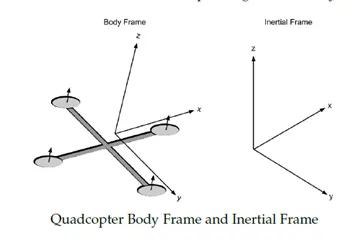 figure from “Demystifying Drone Dynamics” by Percy Jaiswal
The world frame just sits there with its axes pointing in fixed directions , and the body frame is stuck to the drone so it rotates and tilts along with it.
Ok so let me just put it side by side because this confused me for an while :
| feature | world frame | body frame |
|---|---|---|
| origin | fixed point in space (eg. corner of room) | center of the drone |
| axes | fixed directions (east , north , up) | move with the drone |
| who sees this | an outside observer , GPS , the map | the drone itself , the IMU sensors |
| gravity direction | always (0 , 0 , -g) , never changes | depends on how the drone is tilted |
| what stays constant | the axes | nothing , everything moves |
| good for | tracking position , giving goals | applying forces , reading sensors |
The simplest way I think about it now is :
- world frame answers : where is the drone ?
- body frame answers : what is the drone doing ?
And the whole job of an flight controller is to keep translating between these two.
Why You Need Both
Ok so why cant we just pick one and stick to it ? Simple example will clear this up.
Lets say the drone is hovering and you want it to fly forward by 1 meter. You tell the controller “go forward”.
Now what does “forward” even mean ? If you said “forward in the world frame” that is east. But the drone is rotated 90 degrees , so its nose is pointing north. So if it accelerates east , it is actually moving sideways from its own point of view , which is not what we want.
So the controller has to think in body frame : “tilt nose down , accelerate in body x direction” , and then translate that into world coordinates so it can actually update its position on the map.
| what we care about | which frame |
|---|---|
| where the drone is | world |
| where it should go | world |
| which way the motors push | body |
| what the gyroscope reads | body |
| gravity | world (always -z in world) |
So basically the controller is constantly switching between these two frames. World frame for goals and position , body frame for thrust and rotation. And we need an way to convert between them.
The Rotation Matrix : Converting Between Frames
This is where linear algebra finally clicks for robotics. A rotation matrix is an 3x3 matrix $R$ that takes an vector in the body frame and gives you the same vector in the world frame.
\[v_{world} = R \cdot v_{body}\]Lets say the drone is tilted and thrust in body frame is (0, 0, 10) meaning straight up from the drones point of view. To find out what direction this thrust actually points in the real world , we multiply by $R$.
If the drone is flat (not tilted) , $R$ is just the identity matrix and thrust stays (0, 0, 10) , straight up. But if the drone is tilted 30 degrees forward , $R$ will mix the body z into world x and world z , so thrust in world becomes something like (5, 0, 8.6). Meaning 5 units forward and 8.6 units up. This is exactly why tilting the drone makes it move forward , the same thrust now has an horizontal component in the world frame.
And to go from world back to body you use the transpose :
\[v_{body} = R^T \cdot v_{world}\]Rotation matrices have an very nice property that the inverse is the transpose , which is computationally very cheap , you just flip rows and columns , no expensive matrix inversion needed.
Why Quaternions Not Euler Angles
Now in theory you can describe the orientation of the drone with just three angles , roll , pitch , yaw. These are called Euler angles and they are very intuitive. Like roll is tilt to the side , pitch is nose up/down , yaw is rotation around vertical.
But Euler angles have an problem called gimbal lock. When the pitch hits 90 degrees (nose straight up) , roll and yaw become the same axis and you lose one degree of freedom. The math breaks. For an drone doing aggressive maneuvers this is an actual real problem.
So instead we use quaternions which are 4 numbers (qw, qx, qy, qz). They look weird at first , I was very confused about why we need 4 numbers to represent 3 rotations. Short answer is the extra number lets you avoid gimbal lock and also makes the math way smoother for things like integrating angular velocity over time. I will write an separate post on quaternions because they deserve their own deep dive.
If you want an proper visual intuition for quaternions right now , 3Blue1Brown has an amazing video on it here , I watched it twice and the second time it actually clicked.
For now just know that in my simulator the drones orientation is stored as (qw, qx, qy, qz) and when qw = 1 and the others are 0 , the drone is flat with no rotation , identity orientation.
How This Shows Up in My Simulator
Ok now lets see where all this actually appears in code. In my quad dynamics node the state has position in world frame and orientation as an quaternion :
1
2
state_ = {0,0,1, 0,0,0, 1,0,0,0, 0,0,0};
//        px py pz vx vy vz qw qx qy qz wx wy wz
So position is (0, 0, 1) in world frame , velocity is zero , orientation is identity (qw=1) , and angular velocity (wx, wy, wz) is in body frame.
The motors push thrust in body z. But gravity pulls in world z. So every timestep the simulator has to :
- take the thrust from motors (body frame)
- rotate it into world frame using the quaternion
- add gravity (world frame , always pointing down)
- integrate to get new velocity and position
And in the IMU publishing code you can literally see this conversion happening :
1
2
qd_quat_rot(state_.qw, -state_.qx, -state_.qy, -state_.qz,
            0.0, 0.0, QD_GRAVITY, ax, ay, az);
This is taking gravity in world frame (0, 0, g) and rotating it into the body frame (notice the negative signs , thats the conjugate of the quaternion , which inverts the rotation , so its world to body instead of body to world). This is what the accelerometer would actually read , because the IMU is sitting on the drone and measures things in body frame.
And the PID controller does the opposite trick. Quick aside on what a PID is , its short for Proportional Integral Derivative , basically a math formula that looks at “how far off am I from where I want to be” and outputs a correction. Almost every controller in robotics is some form of PID , I will write a full post on it later. For now just think of it as “the thing that turns goals into commands”. In my sim , the PID computes desired acceleration in the world frame (because thats what the user said , “fly to this point”) and then figures out what tilt the drone needs so that its thrust , when rotated into world , produces that acceleration.
1
2
pitch_d = clamp( ax_d / GRAVITY, -0.35, 0.35)
roll_d  = clamp(-ay_d / GRAVITY, -0.35, 0.35)
So basically the whole simulator is just constantly translating between these two frames. World for goals and position , body for thrust and sensors.
Wrap Up
So coordinate frames are not just an math thing , they are the language the drone uses to think about the world. Once you see it , every robotics paper , every controller , every sensor starts making sense.
Key takeaways :
- world frame is fixed to the ground , used for position and goals
- body frame is fixed to the drone , used for thrust and sensors
- rotation matrix (or quaternion) is how you convert between them
- quaternions exist because Euler angles break at 90 degrees
Next post will probably be on quaternions because they deserve their own thing , the 4 number thing is still slightly magical to me even after watching the 3Blue1Brown video on it.
Thanks for reading , if anything here is wrong pls ping me on X and I will fix it.